
When you click Make Kits on the main screen, there are three ways to process your imported folders. The default is Make Kits. The other two, Combine Packs and Process Kit Folders, are alternate methods available from the dropdown arrow next to the button.
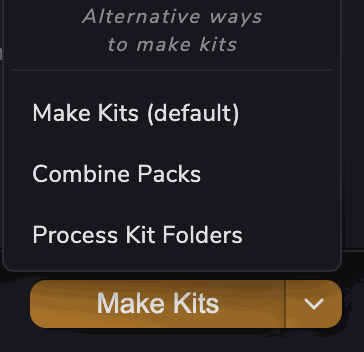
Make Kits (default) #
The standard method. Each imported folder is treated as its own sample pack. Kit Maker categorizes the samples inside and distributes them across kits. For each imported folder, a collection of kit presets will be created.
Combine Packs #
Same as Make Kits, but instead of producing one set of kits per imported folder, it merges everything into a single collection of kits, as if all the samples across every imported pack were sitting in one big pack. You can give the combined collection its own name.
Useful for: – Combining multiple volumes of the same sample pack collection (e.g. “Vol 1”, “Vol 2”, “Vol 3”). – Combining multiple packs of the same genre into one large collection of kits.
Process Kit Folders #
Some packs come as kit folders: one folder per kit, each holding up to 16 sounds meant to go together, usually with the kit’s name.
Import all your kit folders directly, so that each kit folder is shown as its own folder in the import list. Then use the Process Kit Folders button (available in the Make Kits dropdown) to process them. You can give the collection a name to keep its kits organized together.
Kit Maker will:
- Turn each folder into its own kit, named after the folder.
- Put each sample on the right pad based on its filename (kick, snare, hat and so on).
You usually don’t have to choose this yourself. When you import kit folders, or a pack that contains them, Kit Maker notices and offers to process them as kit folders. Samples From Mars packs work the same way.
If you import several kit folders together with normal sample packs, Kit Maker makes the kit-folder kits first and leaves your other packs in the import list. Click Make Kits again to process them.