
Kit Maker creates .adg drum rack presets for Ableton Live and saves them to your Ableton User Library.
For Ableton Move / Ableton Note (separate products), see Ableton Move & Note options.
Where Kits Are Saved #
Kit presets always go to your Ableton User Library, in User Library > Presets > Instruments > Kit Maker Kits.
Where the samples go depends on the Ableton Sample Location preference (in Preferences > Format Options, under Ableton Live):
- Portable (with preset), the default. Each kit’s samples are saved in a
_Samplesfolder right next to its.adgfiles. The kits and their samples travel together, so you can move or share a pack folder without breaking anything. - In User Library (legacy). Samples go to
User Library > Samples > Imported > Kit Maker Samples, the way older versions of Kit Maker worked. With this setting the samples have to stay where they are, because the.adgpresets point at that exact location.
Custom User Library locations (including external drives) are supported either way.
TIP: Drag the Kit Maker Kits folder onto your Places sidebar in Ableton for quick access from the desktop app and from Push.
Setup: Your User Library Location #
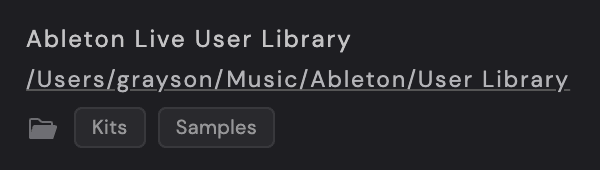
If you have a custom User Library location in your Ableton settings, set the same directory as the Ableton Live User Library path in Kit Maker, under Preferences > Folder Paths. Otherwise the kits won’t link to the samples properly.
To change it, click the path in Preferences > Folder Paths. To reset it to the default location, right-click the path.
Other Preferences #
Ableton Kit Version #
These options are in Preferences > Format Options, under Ableton Live, along with Ableton Sample Location.
Choose between Simpler, Drum Sampler, and Simpler (Live 10). Use Simpler, the default, unless you’re on a version of Ableton Live older than 12.1, in which case use Simpler (Live 10). Drum Sampler also needs Live 12.1 or newer.
Tag kits with “Kit Maker” label #
When enabled, your .adg kits get a “Kit Maker” tag in Ableton’s browser. Off by default.
Reveal Buttons #
The Ableton Live User Library row in Preferences > Folder Paths has two buttons, Kits and Samples, that open those folders in Finder/Explorer. They’re useful for troubleshooting where files are being saved.
Re-processing a Pack #
If you want to re-process the same pack (for example, you changed your mind on a layout), it’s safest to delete the pack’s old kits first.
- With Portable samples (the default), delete the pack’s folder from the Kit Maker Kits folder. Its samples are inside it, so that’s everything.
- With samples In User Library, delete the pack’s folder from both the Kit Maker Kits folder and the Kit Maker Samples folder.
Then re-process the pack. Depending on the changes you made in Preferences, you can sometimes get away with just re-processing the pack (which overwrites the .adg files), but deleting first removes possible hiccups.
Ableton Push #
Kit Maker kits work with Ableton Push, including Ableton Push 3.
When controlling the desktop software with your Push, you can view and open kits from the Places sidebar (on the left of the Ableton Live desktop screen). As suggested above, adding the Kit Maker Kits folder to Places makes it very easy to access them from the Push controller.
Push 3 Standalone #
Your Push needs Ableton Live 12. A Push still running Live 11 won’t load Kit Maker’s portable kits at all, and nothing shows up when you try. To check, go to Settings > Software on the Push. The second line is the Ableton Live version. If it says Live 11, update the Push to Live 12 and the kits will load.
With Portable samples (the default), each kit folder already has its samples inside it, so moving kits to Push 3 is just copying files. In Ableton Live on your desktop, open the Places browser and drag the pack’s folder from Kit Maker Kits into the Push User Library. Transfer the whole pack folder, not individual kits, so each kit’s _Samples folder goes with it and everything stays linked. The kits then load on Push 3 in standalone mode.
If you’ve set Ableton Sample Location to In User Library, the transfer takes more steps. Follow these instructions. That’s also the way to go if your Push has to stay on Live 11: set Ableton Kit Version to Simpler (Live 10) and the sample location to In User Library.
Extras Menu #
- Update Old Ableton Kits (.adg). Only needed by some long-time users with kits made by much older versions of Kit Maker. See Updating .adg Kit Files.
- Convert to Ableton Pack (Beta). Turns a Kit Maker folder of Ableton kits into an Ableton Pack. This is beta and experimental.
Supported sample audio formats #
Ableton Live kits can use .wav, .aiff and .mp3 samples.