
Keywords #
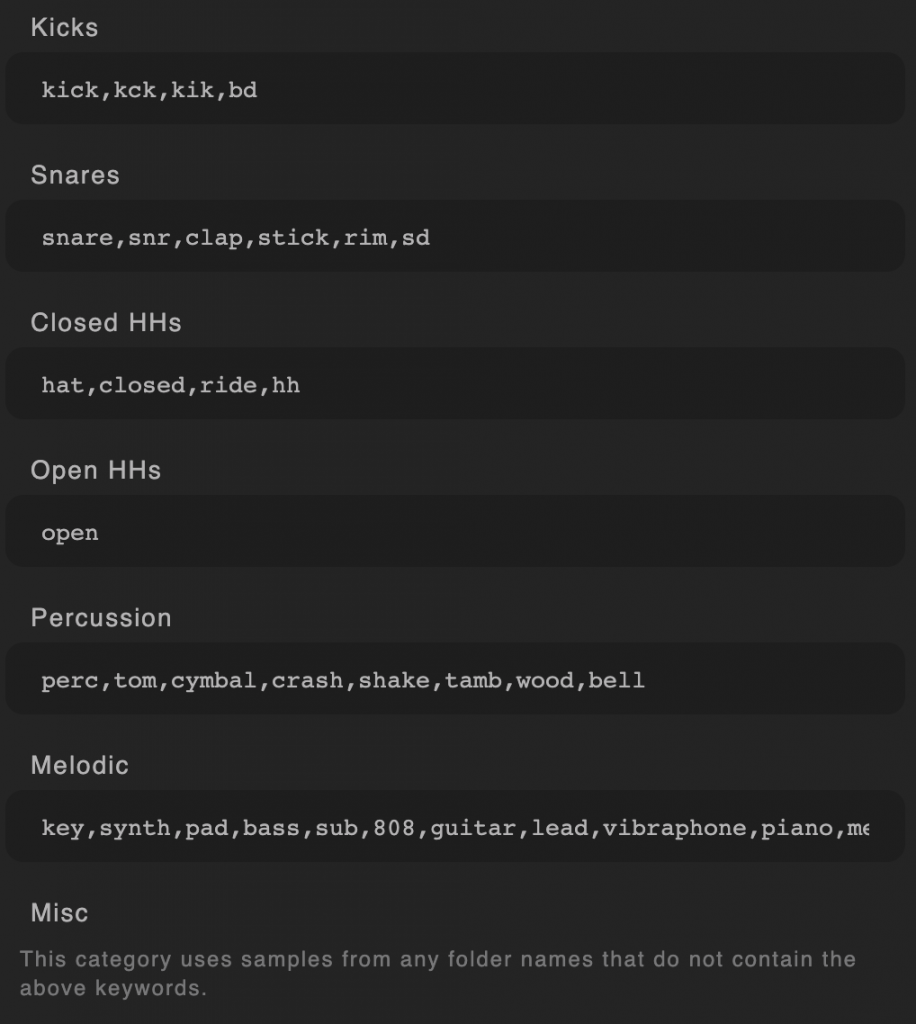
By default, Kit Maker is set up with common keywords to organize your samples automatically. But, if you want to organize them differently, you are free to edit the keywords or add your own in the Keywords section of the Preferences.
Whenever you update Kit Maker, it is good to reset the Keywords, which may have additional Keywords I add over time.
However, if you save your own custom Keywords, you will need to add them again resetting.
Having issues with your kits in Sample Pack Mode?
View the Sample Pack Mode Help page!
It focuses on common fixes and tips for converting Sample Packs.
How the Samples Get Sorted #
Samples will be placed on pads until no more samples of that category are available. If there are no samples left of an individual pad’s category (for example a Kick pad), other samples may be placed on that pad (for example an available Hi Hat).
Kits generated at the end of the process may have empty pads. As the available number of samples becomes less (ie; the kick samples have all been used in earlier kits and there are no kick samples left). Kit Maker will continue making kits until there are no samples left. Because there are an unlimited combination of samples a Sample Pack may contain, it is often the case that many of the final kits will not have the exact balance of samples to make full kits.
Misc Samples work a Little Differently #
The Misc category has a special ability. Misc (or Miscellaneous) samples are any samples that do not match any of the Keywords. In addition to filling the original “Misc” labeled pads, left-over Misc samples are always the first samples to fill in any available empty pads.
For example, if the first kits that are created use up all the Hi-hat samples, the Hi-hat pads will be available for other samples to be added in their place. In this process example, if there are available Snares, Kicks and Misc, the Misc samples will be the first to fill those empty Hi-hat pads.
This is because it is better to save those Snares and Kicks to be put in the next kits that are created in the process. This allows for more kits that are of good quality, that have important samples like Snares and Kicks on the correct pads.
TIP If your kits are ending up with too many empty pads, add samples in a folder called “Misc” (or any other word that is not in the Keywords). The Miscellaneous samples will fill up the empty pads without using up your other, more important samples like Snares and Kicks!
See the Sample Pack Options section (lower in the manual) for more options on using Sample Packs.