
What is Kit Maker?
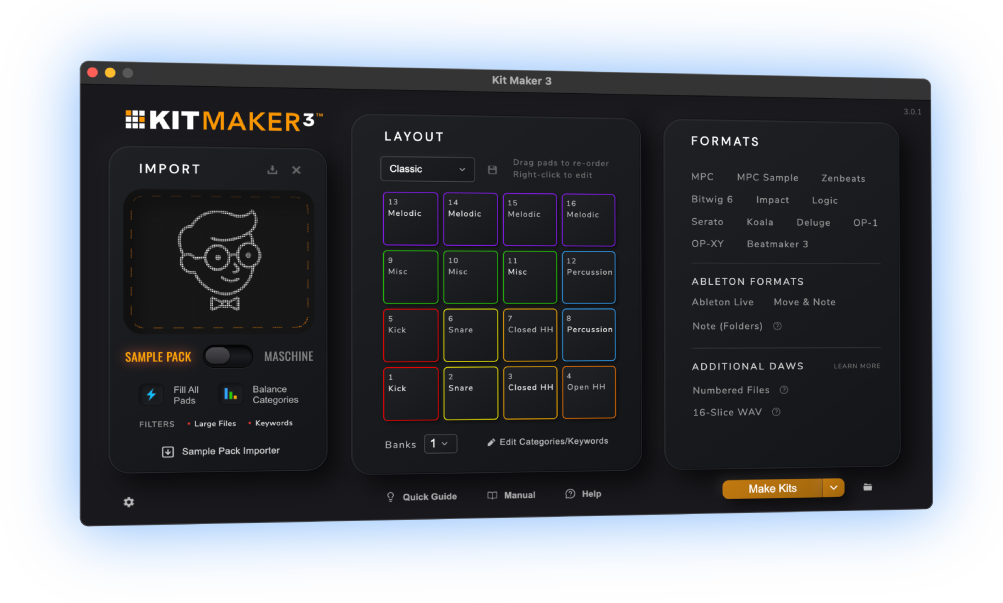
Kit Maker 3 is a desktop app for Mac and Windows that turns drum sample packs and Maschine Expansions into ready-to-play drum kits. Drop in a pack, pick your DAW or device, click Make Kits, and you get a folder of labeled kits with the kicks, snares and hats in a consistent layout from kit to kit.
It makes kits for MPC, MPC Sample, Ableton Live, FL Studio, Logic Pro, Bitwig, Serato Studio and more than a dozen other DAWs, samplers and grooveboxes.
One-time purchase. All Kit Maker 3 updates are free. Apple Silicon Macs and Windows 10 or 11.

How it works
You drop in the packs and load the kits. Kit Maker does the sorting and the pad layout in between.
1.Drop in your packs
Drag one or more pack folders onto the import panel. Use Sample Pack Mode for ordinary packs, MPC Expansions and Samples From Mars packs, or Maschine Mode for Native Instruments Expansions, which Kit Maker finds on your computer so you can import one with a click. Then pick your formats. Choose several and you get every set from the same run.
2.Kit Maker sorts every sample
It reads the way the pack is already organized. Folders named Kicks, Snares or HiHats tell it most of what it needs. If a pack has fewer than three category folders, it reads the filenames instead, so Heavy Kick.wav goes with the kicks.
Every sample ends up in one of seven categories: Kick, Snare, Closed HH, Open HH, Percussion, Melodic and Misc. Loops, demos and files of 2 MB or more are skipped by default, since a pad wants a single hit.
3.It fills the pads, then shows you what it made
Each kit gets 16 pads in a consistent layout, so you know where to find the kicks, snares and hats from kit to kit. Fill All Pads keeps every pad filled, and Balance Categories adjusts the mix to what the pack actually contains, so a kick-heavy pack gives you kick-heavy kits instead of a pile of leftover kicks. A typical pack makes around a dozen kits.
When it’s done, the Summary page shows a card for every pack: what it found in each category, a preview of the first kit’s pads, how many kits it made, and anything it skipped and why. Click the dots on a card to see every kit’s layout and sample list before you load a single one.
4.Load a kit and play
Kits are saved in the format your DAW or device reads natively, so they show up in its browser like any other kit. And because kits use a consistent pad layout, you can program a beat with one kit, swap in another, and the pattern still makes sense with completely different sounds.
Who it’s for
Beat makers who own more sample packs than they use. If you’ve got folders of drum packs on a drive and you build kits by dragging one sample at a time onto pads, Kit Maker does that part for you.
Most people who buy it make beats on an MPC, and a lot of them came for the Maschine Expansions: they own a stack of Native Instruments Expansions, moved to an MPC or to Ableton, and want those kits on the new setup. It works just as well for Push, Logic, Bitwig, the Deluge and the iPad beat apps.
It’s the wrong tool if your packs are mostly loops. Kit Maker builds kits from one-shots, the single hits you play from a pad, and it filters loops out.
Kit Maker at a glance
- What it is
- A desktop app that builds drum kit presets from sample packs you already own.
- Development
- Kit Maker was released in 2019 and has been continually improving.
- Price
- $39, one-time. No subscription. All Kit Maker 3 updates are free.
- Runs on
- Any Apple Silicon Mac (not Intel), and Windows 10 or 11.
- Reads
- Drum sample packs of one-shot samples, Native Instruments Maschine Expansions, MPC Expansions (
.xpmdrum programs), Samples From Mars packs, and folders that are already one kit each. - Makes
- 16-pad drum kits in each DAW or device’s own preset format, plus 16-slice WAVs and numbered sample folders for other samplers. Full list below.
Maschine Expansions to MPC, Ableton and more
This is what Kit Maker is best known for. Import your Maschine Expansions and it rebuilds the drum kits inside them, with the original kit names and pad order, as kits for any format it supports.
It converts the drum kits, not the instrument presets.
Convert Maschine Expansions to MPC kits





What it makes
Real presets in that DAW or device’s own format.
Akai
- MPCMPC X, Live, One, Key and Force, plus the MPC desktop software and MPC Beats
- MPC Sample
Ableton
- Ableton Live 10, 11 and 12Including Push 3 in standalone mode
- Ableton Move and NoteOne file per kit that works on both
Other DAWs
- FL StudioFPC kits with colored, iconed pads
- Logic ProDrum Machine Designer kits, up to 3 banks
- Bitwig StudioBitwig 6 and later
- Serato Studio
- Studio One / Fender Impact
- Zenbeats
Hardware
- Synthstrom Deluge
- Teenage Engineering OP-1 and OP-1 Field
- Teenage Engineering OP-XY
iPad and iPhone
- Koala Sampler
- BeatMaker 3
- EG Pulse
- NanoStudio 2
Any sampler
- 16-slice WAVEach kit as one WAV with 16 slices
- Numbered Files16 numbered samples per kit that you drag onto a pad grid in one go
Additional kits can be made through the Numbered Files format: 16 samples per kit, numbered so you can drag them onto a pad grid in one go. Pick as many formats as you want per run.
Works through Numbered Files
- Roland SP-404 MKII
- Reason (Kong and Umpf)
- Groove Agent SE 5
- Geist2
- Novation Circuit Rhythm and Circuit Tracks
- iMPC 2
What’s new in Kit Maker 3
- New formats: MPC Sample, FL Studio, Logic Pro, Bitwig, Koala, Serato Studio, Studio One / Fender Impact, Zenbeats, OP-1, OP-XY and 16-slice WAV.
- Much more consistent kits from sample packs, thanks to Fill All Pads and Balance Categories.
- The Summary page, so you can see how every kit came out before you open your DAW.
- Pad colors in the app itself. Set a color per category, or pick the FL Studio, MPC or Serato theme, and kits on the formats that support pad colors (MPC, FL Studio, Bitwig, Serato Studio, Impact and Koala) get the same colors, as do the RGB pads of Fender Studio controllers.
- Right-click any pad to change it, rename a category (Percussion to 808s, say), and save the result as your own layout.
- MPC Expansions convert every bank. Kit Maker 2 only took the first.
- One-click Maschine import, and built-in support for Samples From Mars packs.
What people say
“A very useful tool, not just for converting NI stuff, but even your own custom packs.”
— Ave Mcree
“A super easy way to convert the expansions.”
— Sanjay C, Native Instruments Blog
“Very easy to use.”
— Jef Gibbons
Price and system requirements
$39one-time
No subscription. All Kit Maker 3 updates are free. You buy it once on kit-maker.com and it’s yours.
Already own Kit Maker 2?
If you bought it in the year before launch, Kit Maker 3 is free. Earlier buyers get 30% off. Get your upgrade code.
- MacAny Apple Silicon Mac (M1 or later)
- WindowsWindows 10 or Windows 11
- Intel MacsNot supported. Kit Maker 2 still runs on them.
- You’ll also needThe DAW, device or app you’re making kits for. Kit Maker makes the kit files; you load them there to play.
FAQ
Does Kit Maker convert the whole Maschine Expansion?
No. It rebuilds the drum kits inside your Maschine Expansions, with their original kit names and pad order. The instrument presets aren’t converted.
I already own Kit Maker 2. Do I have to pay again?
Kit Maker 3 is a new app with a new license. If you bought Kit Maker 2 on or after October 19, 2025, Kit Maker 3 is free. If you bought it before that, you get 30% off. Enter your purchase email on the upgrade page and your code is emailed to you.
Will Kit Maker 3 run on an Intel Mac?
No. Kit Maker 3 needs an Apple Silicon Mac (M1 or later). Kit Maker 2 still runs on Intel Macs.
Can I change which sounds go on which pads?
Yes. You can change the whole pad layout, right-click any pad to change its category, rename categories (Percussion to 808s, for example), edit the keywords that decide how samples are sorted, and set each category’s color. On formats that support pad colors, your kits get the same colors (MPC, FL Studio, Bitwig, Serato Studio, Impact and Koala).