
Convert Maschine Expansions to MPC Kits

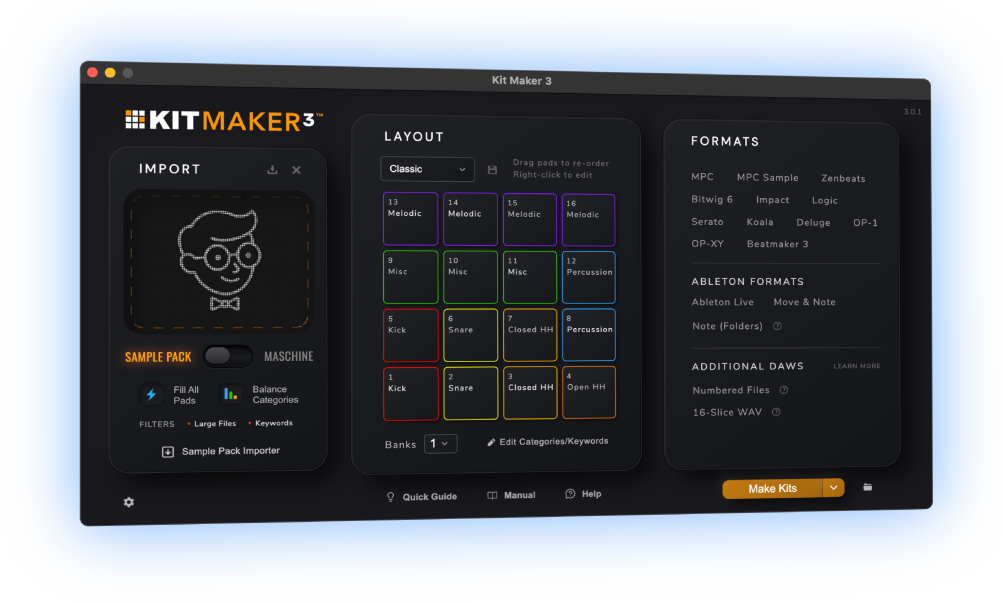
Keep the Maschine sounds you love. Kit Maker rebuilds the drum kits from your Native Instruments Maschine Expansions as MPC programs, organized and ready to load on MPC Live, MPC X, MPC One and more. Drag in an Expansion, click once, and play.
$39 one-time purchase. No subscription.
 As featured on Native Instruments blog
How to Convert Maschine to MPC
- 1
Import your Expansions
Drag your Maschine Expansion folders into Kit Maker.
- 2
Kit Maker builds the kits
Every kit in the Expansion, converted at once, in a consistent pad order.
- 3
Your kits are ready to load
Presets are named after the original kits, organized and in the correct layout.
You don’t need Maschine hardware, or even the Maschine software. Just the Expansion files on your computer. Using Ableton instead? See how to use Maschine in Ableton →
Your Maschine drum kits, playable on MPC
Kit Maker reads your Maschine Expansions (now branded Native Instruments Expansions) and creates standard MPC programs in the .xpm format. Your Maschine kits are ready to transfer to your MPC.


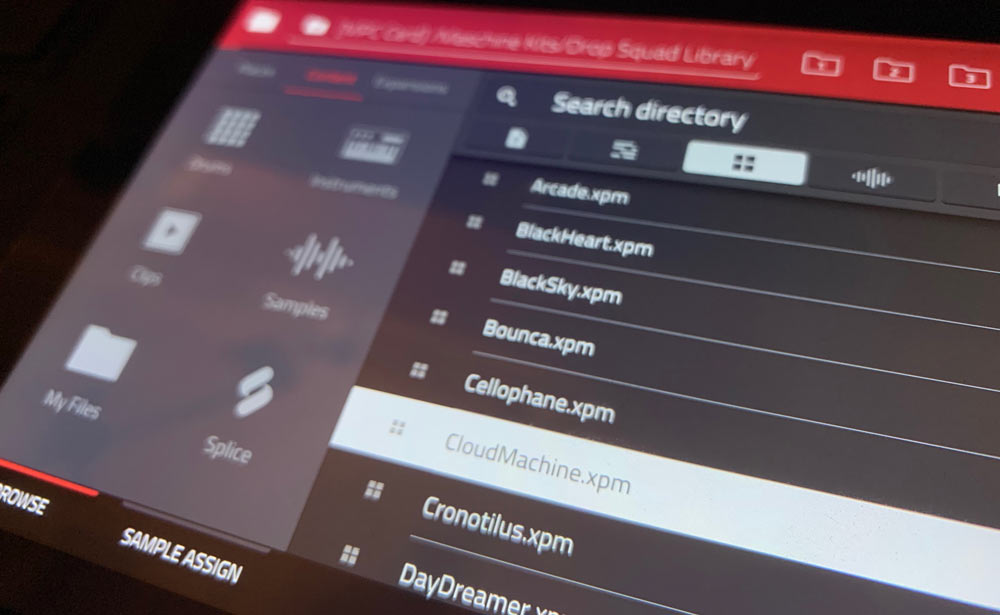
On your MPC, organized and ready to load
Your kits show up right in the MPC browser, organized by Expansion, labeled with the kit names you already know, with each pad colored by drum type. Loading a kit takes seconds. And because kits use a consistent layout, you can swap kits on your drum patterns and instantly hear them with new sounds.
Watch an MPC creator use Maschine on MPC
Watch Ave Mcree’s video on YouTubeAs Seen On


“A super easy way to convert the expansions.”
— Sanjay C, Native Instruments Blog“A very useful tool, not just for converting NI stuff, but even your own custom packs.”
— Ave Mcree“Very easy to use.”
— Jef GibbonsWhich MPCs are supported?
Kit Maker builds standard MPC .xpm drum programs. They load on any modern Akai MPC running MPC 2 or MPC 3, hardware or software. If your MPC opens .xpm kits, Kit Maker works with it.
MPC X · MPC X SE · MPC XL · MPC Live · MPC Live II · MPC Live III · MPC One · MPC One G2 · MPC One+ · MPC Key 61 · MPC Key 37 · MPC Key 37 G2 · Akai Force · and more
MPC 2 (Desktop) · MPC 3 (Desktop) · MPC Beats. Plus controllers like MPC Studio and MPC Touch, used with the desktop app
Built for modern MPCs that use .xpm files. Doesn’t support legacy MPC hardware that relies on .pgm files. Not affiliated with Akai or Native Instruments.
Samples/Instruments folder (not all of them convert). See Preset Maker →Maschine to MPC questions
Do I need Maschine hardware?
No. You just need the Expansion files installed on your computer. No Maschine hardware or software required. Native Instruments featured Kit Maker for exactly this reason.
Which Maschine Expansions work?
Official Native Instruments Maschine Expansions and the Maschine Factory Library (the “Maschine 2 Library” folder). Third-party Maschine packs aren’t supported, though you can often process those in Sample Pack Mode instead if they’re organized by folder or filename.
Can I keep using Maschine too?
Yes. Kit Maker reads your Expansion folders and saves the new kits somewhere else, so your Maschine library is left exactly as it is. Run both setups off the same sounds, or move over to MPC for good without rebuilding years of kits by hand. The converted kits load the same way on MPC hardware and on MPC Desktop.
Does it keep the kits faithful?
Each kit is built from the Expansion’s own one-shot samples and keeps the original kit name, laid out in a consistent pad order. Pads are colored by drum type, with audio previews on most kits. It converts the drum kits rather than the playable instrument presets.
Does it convert Maschine instruments too?
Kit Maker converts the drum kits. For melodic instruments, my companion app Preset Maker converts some Maschine instruments into MPC keygroup presets: the ones in an Expansion’s Samples/Instruments folder. See Preset Maker →
Which MPCs are supported?
Any MPC running modern MPC software (the .xpm format, MPC 2 or MPC 3): MPC X, X SE, XL, Live, Live II, Live III, One, One G2, One+, Key 61, Key 37, Key 37 G2 and Akai Force, plus MPC 2/3 Desktop and MPC Beats. See the full list above. Want the converted kits packaged as a real MPC Expansion? Here’s how to make MPC Expansions.
Is it a subscription?
No. Kit Maker is a one-time purchase of $39, for both Mac and PC.
Still have questions? Visit the Kit Maker FAQ.
About Maschine Expansions
Maschine Expansions, now branded Native Instruments Expansions, are genre-themed sound packs from NI. There are over 150 of them.
What is a Maschine Expansion (a.k.a. Native Instruments Expansion)?
Same product, new name. Native Instruments rebranded “Maschine Expansions” to “Native Instruments Expansions” to push their use beyond Maschine. Each one bundles ready-made drum kits (for Maschine and Battery) plus one-shot samples and loops. NI markets the loose samples for use in any DAW, but the ready-made kits only ever exist in Maschine and Battery form. That gap is the one Kit Maker fills for MPC owners.
What about official Native Instruments MPC Expansions?
Akai sells official MPC ports of about 10 Expansions at $39 each. They’re polished and add instrument plugins, so they’re a good buy if the one you want is among the ten. But you pay again even for Expansions you already own on Maschine, and the other 140-plus have no official port at all. For those, Kit Maker converts the drum kits you already paid for.
How do I know if I have a compatible Expansion?
If the product is labeled an “Expansion” and its details list something like “50 Maschine Kits,” it works with Kit Maker. Synth Expansions (such as Massive X or Leap) and Kontakt .nki instruments aren’t drum Expansions and won’t convert.
Where are my Expansions on my computer?
They live in your Native Instruments content folder, alongside your Maschine content. On Mac the folder names often end in “Library” (for example, “Amplified Funk Library”). The manual has step-by-step instructions for locating them on Mac and PC. See the full Maschine guide in the manual → If a kit doesn’t come out how you expected, there’s a Maschine troubleshooting guide too.
How faithful is the conversion?
Each kit is built from the Expansion’s own one-shot samples, so you’re hearing the originals, not approximations. Kit Maker keeps the original kit names, and lays every kit out in a consistent pad order. Pads come colored by drum type, with audio previews on most kits.
Kit Maker converts the drum kits, not the playable instrument presets. Official Native Instruments Expansions and the Maschine Factory Library work. Third-party Maschine packs don’t. Most kits are built from .wav files, which Kit Maker converts directly. Occasional sounds generated inside the Maschine software itself may show up as an empty pad, but the vast majority of drum sounds transfer fine.
Don’t use Maschine? Make MPC kits from any sample pack →
Making kits for Maschine instead? Build Maschine drum kits from your sample packs →
Get your Maschine Expansions onto your MPC
$39 one-time purchase. No subscription. · For Mac & PC