
Looking for something else? Order issues · Find your license · Lemon Squeezy License Help · Registration Help
Manage Your Lemon Squeezy Licenses
Each license is for one user, but you can activate it on up to two computers at once.
Find your licenses on the Lemon Squeezy My Orders page. You can also remotely deactivate it on computers you no longer use. This will free up your license to activate a new computer.
See My LicensesOpens the My Orders page on Lemon Squeezy. Don’t know your password? Reset it here.
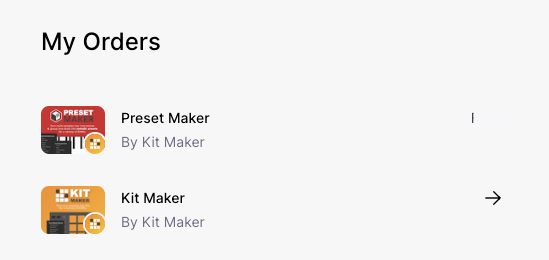
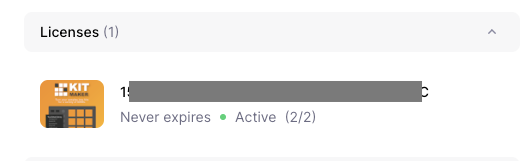
Access your licenses
Any licenses you purchased on your account will show up here. Click on a license to show the license details.
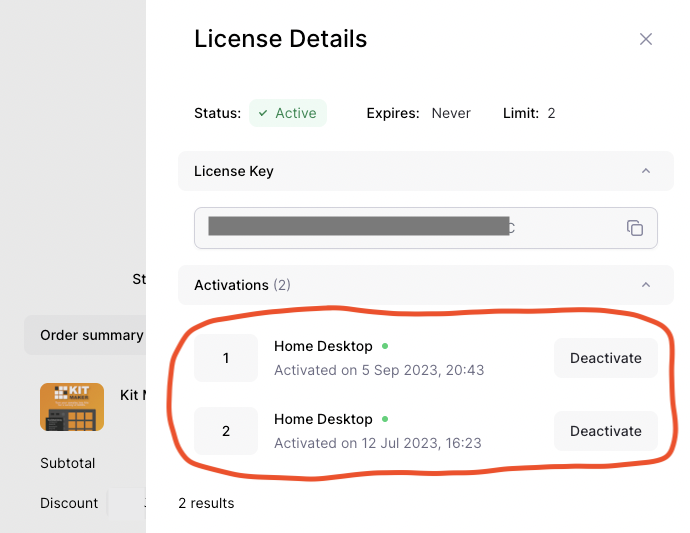
Deactivate a computer
The license details provide info on the 2 activations each license allows.
Each computer you register counts as an “activation.” Each activation has a nickname you can optionally customize, to remember which computer is which.
To deactivate a computer, simply click the Deactivate button under the Activations list. When you have less than two computers activated, you can then use your license on a new computer.
You can deactivate a computer even if you lost access to it.
Or deactivate inside the app itself
You can also deactivate a Lemon Squeezy license directly in the app itself.
- Go to the menu under Help > License Info…
- Press the button to Deactivate the license from the current computer.
- Copy your license number, then activate the app on another computer.