
> Help with Finding/Missing Receipt
> Registration HelpAdditional help pages can be found above
Manage Your Lemon Squeezy Licenses
Each license is for one user, but you can activate it on up to 2 computers at once. The Lemon Squeezy“My Orders” page lets you remotely deactivate computers you have activated in the past. This will free up your license to activate a new computer.
My Orders page: Deactivate uses, access downloads, receipts and more
Don’t know your password? Reset it here.
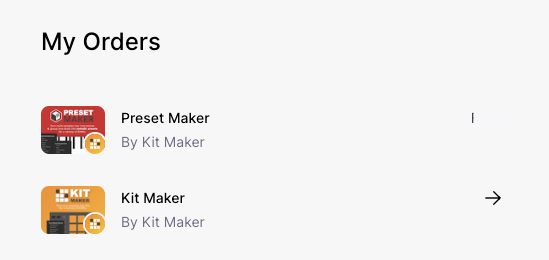
Access your Licenses
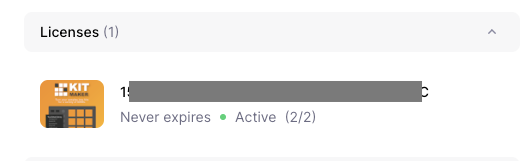
Any licenses you purchased on your account will show up here.
Click on a License to show the license details.
Deactivate a Computer
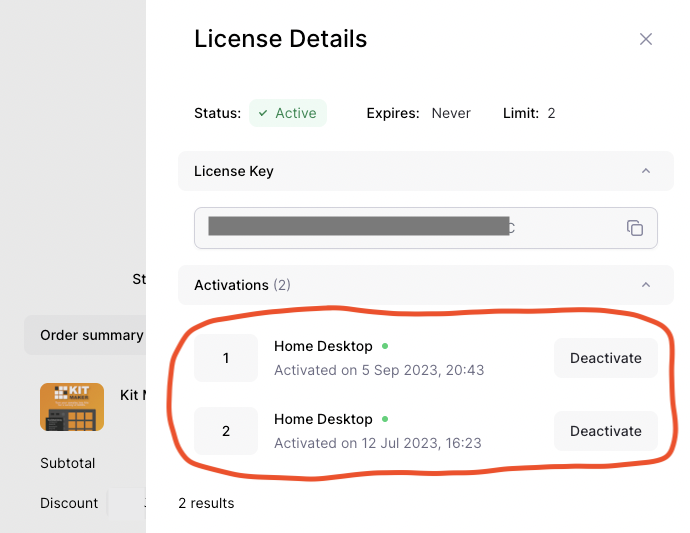
The license details provide info on the 2 activations each license allows.
Each computer you register counts as an “activation.” Each activation has a nickname you can optionally customize, to remember which computer is which.
To deactivate a computer, simply click the Deactivate button under the Activations list. When you have less than two computers activated, you can then use your license on a new computer.
You can deactivate a computer, even if you lost access to it.
Or Deactivate Inside the App Itself
You can also deactivate a Lemon Squeezy license directly in the app itself.
Go to the Menu under Help > License Info…
There is a button to Deactivate the license from the current computer.
You can copy your license number and then activate the app on another computer.